
Understanding reactivity
MobX usually reacts to exactly the things you expect it to, which means that in 90% of your use cases MobX should "just work". However, at some point you will encounter a case where it does not do what you expected. At that point it is invaluable to understand how MobX determines what to react to.
MobX reacts to any observable property that is read during the execution of a tracked function.
- "reading" is dereferencing an object's property, which can be done through "dotting into" it (eg.
user.name) or using the bracket notation (eg.user['name'],todos[3]) or destructuring (eg.const {name} = user). - "tracked functions" are the expression of
computed, the rendering of anobserverReact function component, therender()method of anobserverbased React class component, and the functions that are passed as the first param toautorun,reactionandwhen. - "during" means that only those observables that are read while the function is executing are tracked. It doesn't matter whether these values are used directly or indirectly by the tracked function. But things that have been 'spawned' from the function won't be tracked (e.g.
setTimeout,promise.then,awaitetc).
In other words, MobX will not react to:
- Values that are obtained from observables, but outside a tracked function
- Observables that are read in an asynchronously invoked code block
MobX tracks property access, not values
To elaborate on the above rules with an example, suppose that you have the following observable instance:
class Message {
    title
    author
    likes
    constructor(title, author, likes) {
        makeAutoObservable(this)
        this.title = title
        this.author = author
        this.likes = likes
    }

    updateTitle(title) {
        this.title = title
    }
}

let message = new Message("Foo", { name: "Michel" }, ["Joe", "Sara"])
In memory this looks as follows. The green boxes indicate observable properties. Note that the values themselves are not observable!
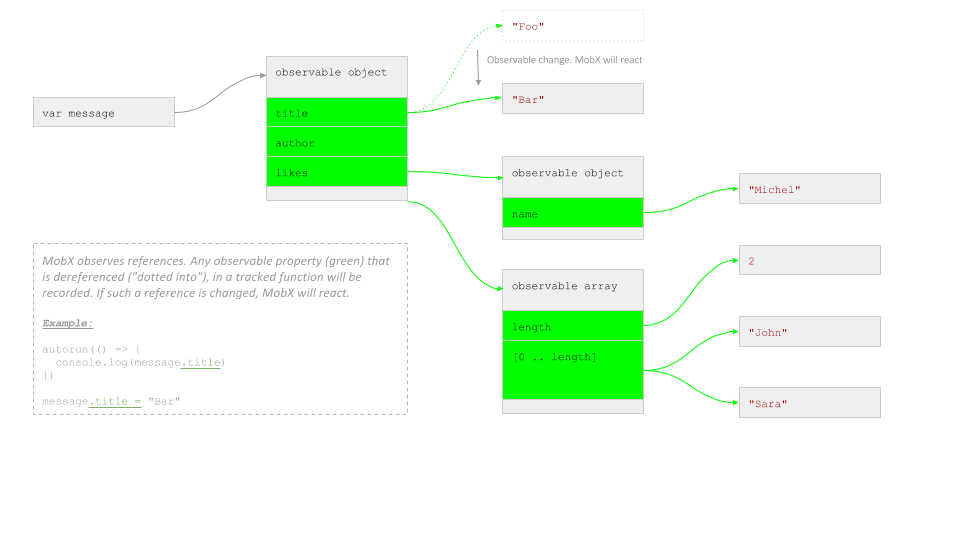
What MobX basically does is recording which arrows you use in your function. After that, it will re-run whenever one of these arrows changes; when they start to refer to something else.
Examples
Let's show that with a bunch of examples (based on the message variable defined above):
Correct: dereference inside the tracked function
autorun(() => {
    console.log(message.title)
})
message.updateTitle("Bar")
This will react as expected. The .title property was dereferenced by the autorun, and changed afterwards, so this change is detected.
You can inspect what MobX tracks by calling getDependencyTree with the disposer returned by autorun:
import { getDependencyTree } from "mobx"

const disposer = autorun(() => {
    console.log(message.title)
})

// Outputs:
console.log(getDependencyTree(disposer))
// { name: 'Autorun@2', dependencies: [ { name: 'Message@1.title' } ] }
Incorrect: changing a non-observable reference
autorun(() => {
    console.log(message.title)
})
message = new Message("Bar", { name: "Martijn" }, ["Felicia", "Marcus"])
This will not react. message was changed, but message is not an observable, just a variable which refers to an observable, but the variable (reference) itself is not observable.
Incorrect: dereference outside of a tracked function
let title = message.title
autorun(() => {
    console.log(title)
})
message.updateMessage("Bar")
This will not react. message.title was dereferenced outside of autorun, and just contains the value of message.title at the moment of dereferencing (the string "Foo"). title is not an observable so autorun will never react.
Correct: dereference inside the tracked function
autorun(() => {
    console.log(message.author.name)
})

runInAction(() => {
    message.author.name = "Sara"
})
runInAction(() => {
    message.author = { name: "Joe" }
})
This reacts to both changes. Both author and author.name are dotted into, allowing MobX to track these references.
Note that we had to use runInAction here to be allowed to make changes outside
of an action.
Incorrect: store a local reference to an observable object without tracking
const author = message.author
autorun(() => {
    console.log(author.name)
})

runInAction(() => {
    message.author.name = "Sara"
})
runInAction(() => {
    message.author = { name: "Joe" }
})
The first change will be picked up, message.author and author are the same object, and the .name property is dereferenced in the autorun.
However, the second change is not picked up, because the message.author relation is not tracked by the autorun. Autorun is still using the "old" author.
Common pitfall: console.log
autorun(() => {
    console.log(message)
})

// Won't trigger a re-run.
message.updateTitle("Hello world")
In the above example, the updated message title won't be printed, because it is not used inside the autorun.
The autorun only depends on message, which is not an observable, but a variable. In other words, as far as MobX is concerned, title is not used in the autorun.
If you use this in a web browser debugging tool, you may be able to find the
updated value of title after all, but this is misleading -- autorun run after all has run once when it was first called. This happens because console.log is an asynchronous function and the object is only formatted later in time. This means that if you follow the title in the debugging toolbar, you can find the updated value. But the autorun does not track any updates.
The way to make this work is to make sure to always pass immutable data or defensive copies to console.log. So the following solutions all react to changes in message.title:
autorun(() => {
    console.log(message.title) // Clearly, the `.title` observable is used.
})

autorun(() => {
    console.log(mobx.toJS(message)) // toJS creates a deep clone, and thus will read the message.
})

autorun(() => {
    console.log({ ...message }) // Creates a shallow clone, also using `.title` in the process.
})

autorun(() => {
    console.log(JSON.stringify(message)) // Also reads the entire structure.
})
Correct: access array properties in tracked function
autorun(() => {
    console.log(message.likes.length)
})
message.likes.push("Jennifer")
This will react as expected. .length counts towards a property.
Note that this will react to any change in the array.
Arrays are not tracked per index / property (like observable objects and maps), but as a whole.
Incorrect: access out-of-bounds indices in tracked function
autorun(() => {
    console.log(message.likes[0])
})
message.likes.push("Jennifer")
This will react with the above sample data because array indexes count as property access. But only if the provided index < length.
MobX does not track not-yet-existing array indices.
So always guard your array index based access with a .length check.
Correct: access array functions in tracked function
autorun(() => {
    console.log(message.likes.join(", "))
})
message.likes.push("Jennifer")
This will react as expected. All array functions that do not mutate the array are tracked automatically.
autorun(() => {
    console.log(message.likes.join(", "))
})
message.likes[2] = "Jennifer"
This will react as expected. All array index assignments are detected, but only if index <= length.
Incorrect: "use" an observable but without accessing any of its properties
autorun(() => {
    message.likes
})
message.likes.push("Jennifer")
This will not react. Simply because the likes array itself is not being used by the autorun, only the reference to the array.
So in contrast, message.likes = ["Jennifer"] would be picked up; that statement does not modify the array, but the likes property itself.
Correct: using not yet existing map entries
const twitterUrls = observable.map({
    Joe: "twitter.com/joey"
})

autorun(() => {
    console.log(twitterUrls.get("Sara"))
})

runInAction(() => {
    twitterUrls.set("Sara", "twitter.com/horsejs")
})
This will react. Observable maps support observing entries that may not exist.
Note that this will initially print undefined.
You can check for the existence of an entry first by using twitterUrls.has("Sara").
Observable maps are a good fit for dynamically keyed collections, although plain observable objects can track added properties as well.
MobX does not track asynchronously accessed data
function upperCaseAuthorName(author) {
    const baseName = author.name
    return baseName.toUpperCase()
}
autorun(() => {
    console.log(upperCaseAuthorName(message.author))
})

runInAction(() => {
    message.author.name = "Chesterton"
})
This will react. Even though author.name is not dereferenced by the function passed to autorun itself, MobX will still track the dereferencing that happens in upperCaseAuthorName, because it happens during the execution of the autorun.
autorun(() => {
    setTimeout(() => console.log(message.likes.join(", ")), 10)
})

runInAction(() => {
    message.likes.push("Jennifer")
})
This will not react because during the execution of the autorun no observables were accessed, only during the setTimeout, which is an asynchronous function.
Check out the Asynchronous actions section as well.
Using non-observable object properties
autorun(() => {
    console.log(message.author.age)
})

runInAction(() => {
    message.author.age = 10
})
This will react for objects created with observable or observable.object.
Note that this is only done for objects created with observable or observable.object. New properties on class instances will not be made observable automatically.
TL;DR
MobX reacts to any observable property that is read during the execution of a tracked function.